9am
Product post
in


FLOW brings your brand context, creation, approval and scheduling into one place, so your team can publish at a steady pace without losing the thread.
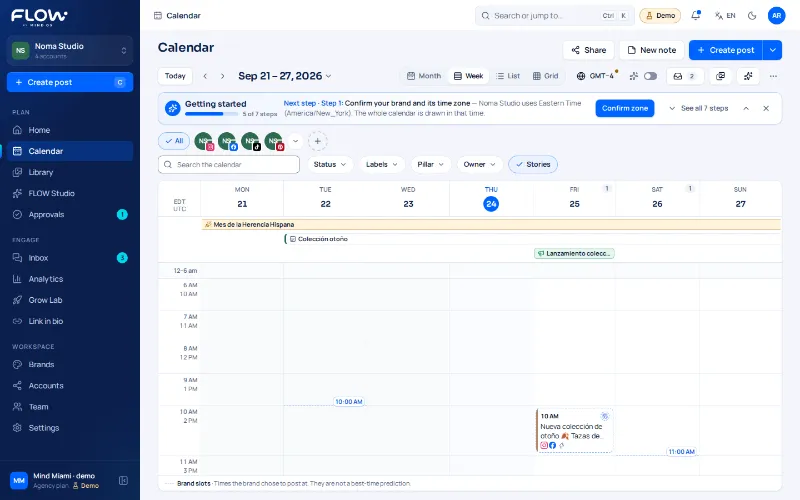
Illustrative preview of the FLOW calendar: a week in September 2026 with sample posts spread across Instagram, TikTok and LinkedIn, and an empty slot ready for a new post to be dropped in.
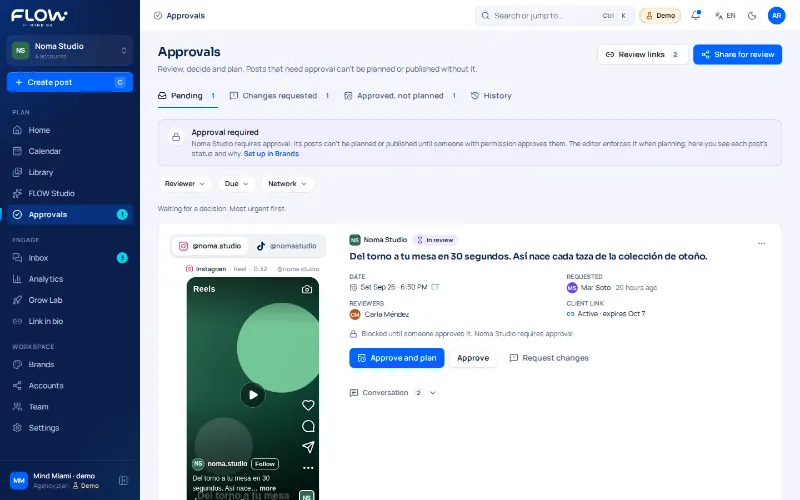
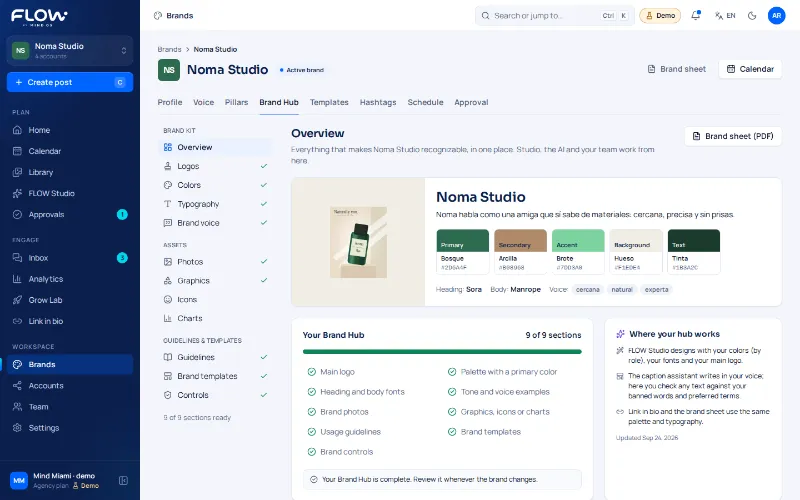
FLOW screenshots with the data of an example brand (Noma Studio). The interface is real; the data is fictional.
The networks FLOW will publish to, with their real status today.
“Compatible with” means FLOW is designed to publish to those networks: it doesn’t mean they are clients or partners. Names and logos belong to their owners. “Proven” means a real post confirmed by the provider. Google Drive is a separate choice, file by file, and is still in development. See the detail per network.
Five steps in one place. Each one says what state it is in today.
Step 1 of 5
Every brand keeps its voice, its audience and its rules, so whoever creates never starts from zero.
In development Sample-data view
Step 2 of 5
Prepare the post once and adapt it to each network, with the brand’s voice in sight.
In development AI: built, not switched on yet
Example with fictional data of the FLOW editor: the example brand Noma Studio requires approval before planning, one example Instagram account is selected, the text has its character counter and the status is Draft, with the next steps In review, Approved, Planned, Scheduled and Published.
Step 3 of 5
Feedback next to the post, with one clear version. Approving isn’t publishing.
In development
Step 4 of 5
Pick when, which accounts and the brand’s local time. Three separate steps: approve, schedule and publish.
Instagram proven · the rest, coming soon
Step 5 of 5
Numbers with their source and period, no invented zeros.
In development Real metrics: with connected accounts
Example with fictional data of analytics: three figures with their source and period (impressions, engagements and link clicks), where link clicks show a dash because the network didn’t report them, and an illustrative bar chart. With no data a dash is shown, never a made-up zero.
One concrete task, its result and a next step for each profile.
Agencies
Creators
Local businesses
Example: an agency with three brands. Noma Café, Luz Estudio and Órbita are example brands, not real clients.

Noma Café Example
2 to review

Luz Estudio Example
3 scheduled

Órbita Example
1 draft
Choose the space your brand or team needs.
Creators and businesses with one brand.
$29USD/mo
Billed monthly · launch price
Request access · CreatorMarketers and small teams with several brands.
$59USD/mo
Billed monthly · launch price
Request access · GrowthAgencies managing several clients.
$199USD/mo
Billed monthly · launch price
Request access · AgencyA social profile, like your Instagram or TikTok, linked to a brand inside FLOW. A brand can have several connected accounts.
Publishing starts with Instagram and Facebook (today only Instagram is proven); TikTok and the rest follow, subject to each network's authorization. See the status of every integration.
They are three separate steps: approving content doesn't publish it, and scheduling it doesn't either; the post goes out at the chosen time and each network confirms it received it.
Yes, anytime from Settings › Plan. You stay active until the end of the period you already paid for.
Connecting Drive is voluntary and separate from signing in with Google: you pick files one by one to bring into FLOW, never an automatic sync of your whole drive.
Approving is a decision your team or client makes about the content. Publishing is the real action toward the network, at the scheduled date and time. An approved post is still waiting for its time slot.
The AI assistant is built but not switched on yet: today it doesn’t generate suggestions. Once it is, every result will say it comes from a model and a person will review it. See what exists today in FLOW AI.
It’s in preparation: the MCP connectors are implemented and tested locally, but not yet deployed or connected to any real assistant. When they are, an assistant will only be able to read your brands and save drafts; never publish. See the status of each connector.